As an ASP.NET guy I’ve never really had to worry about url rewriting using 3rd party components due to the fact that I can easily write my own HttpModule that handles url rewriting in the request pipeline.
You can imagine the fun I had setting up this blog then, since it’s running PHP on IIS. Because IIS does not have mod_rewrite I installed Helicon’s ISAPI_Rewrite. This is a fantastic product, offering pretty much everything that mod_rewrite offers. Unfortunately their tutorial on how to set it up on WordPress doesn’t quite meet my needs. Sure, it handles the rewrite for blog posts, but what about the urls for tags, categories, calendar filtering and all the other urls my blog generates.
So how can you make ISAPI ReWrite handle all the friendly URLs that WordPress generates? The trick is to choose a default Permalink setup that suits your requirements. I opted for “Day and name” which formats the url like /index.php/%year%/%monthnum%/%day%/%postname%/
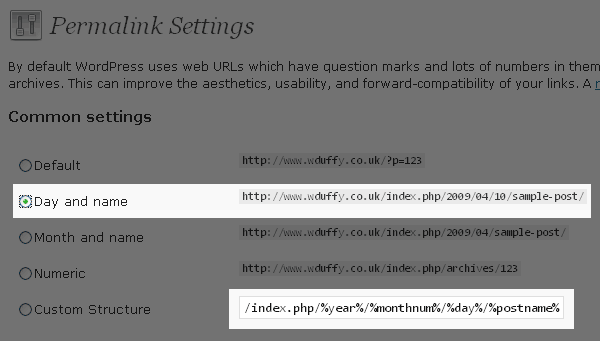
Once selected remove /index.php from the front of the Custom Structure. It should now look like
/%year%/%monthnum%/%day%/%postname%/
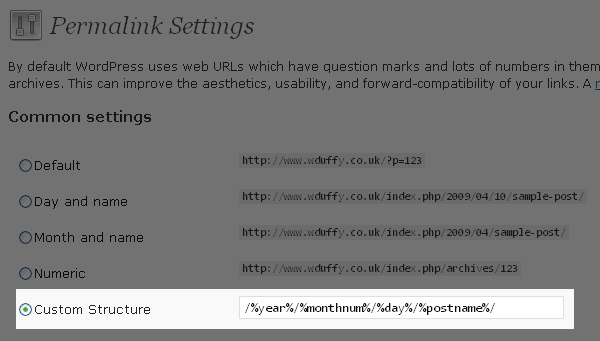
Then, it’s simply a case of setting up a rewrite in your
.htaccess file (ISAPI_REWRITE 3) or
httpd.ini file (ISAPI_REWRITE 2)
which prepends /index.php to the front of all requests without a file extension (i.e a friendly wordpress url).
RewriteBase /
RewriteCond %{REQUEST_FILENAME} !-f
RewriteCond %{REQUEST_FILENAME} !-d
RewriteRule ([^.]*) /index.php/$1 [L]